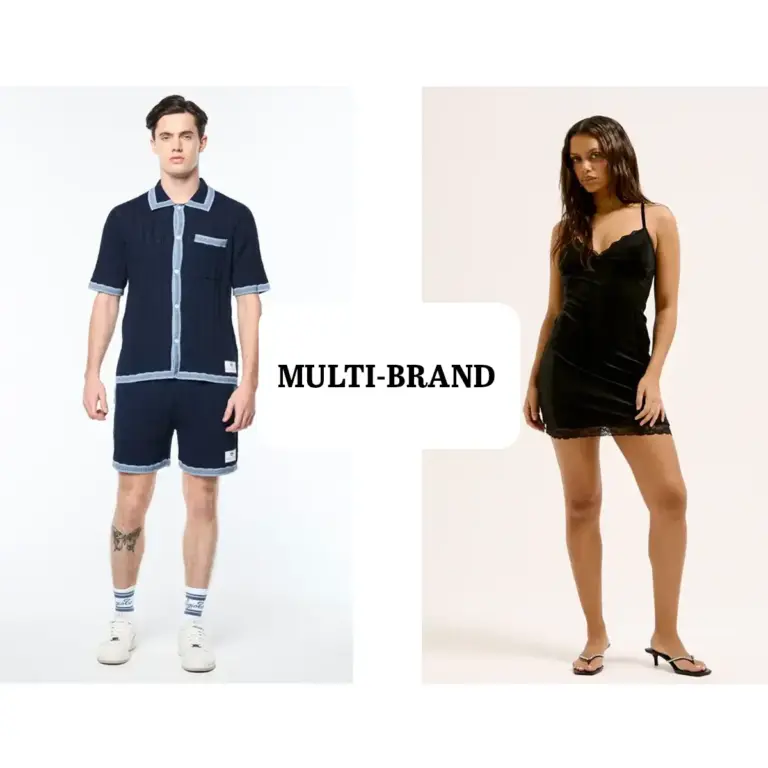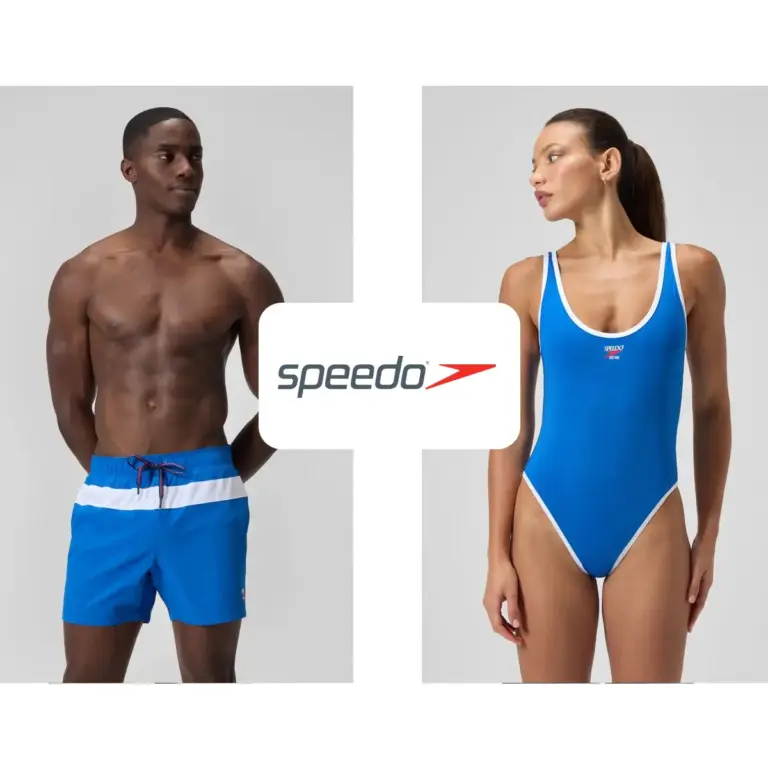
Permite a Tus Clientes Probar Tus Productos en Línea
La función de Prueba Virtual de PRIME AI permite a los clientes ver tus productos en su propio cuerpo. Aumenta la confianza del comprador, reducir las devolucionesy mejora las páginas de productos con vistas previas realistas en el cuerpo. Perfecto para minoristas de moda que buscan ofrecer un compras modernas experiencia.
Prueba Virtual
Simple y Fácil de Usar
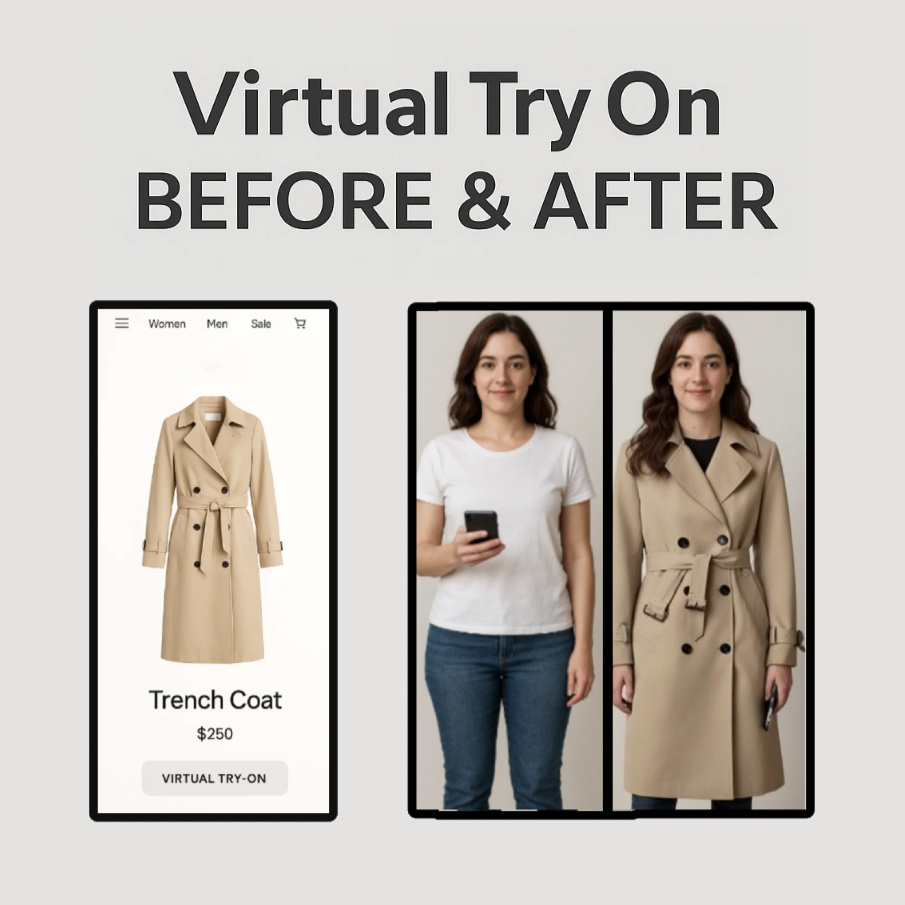
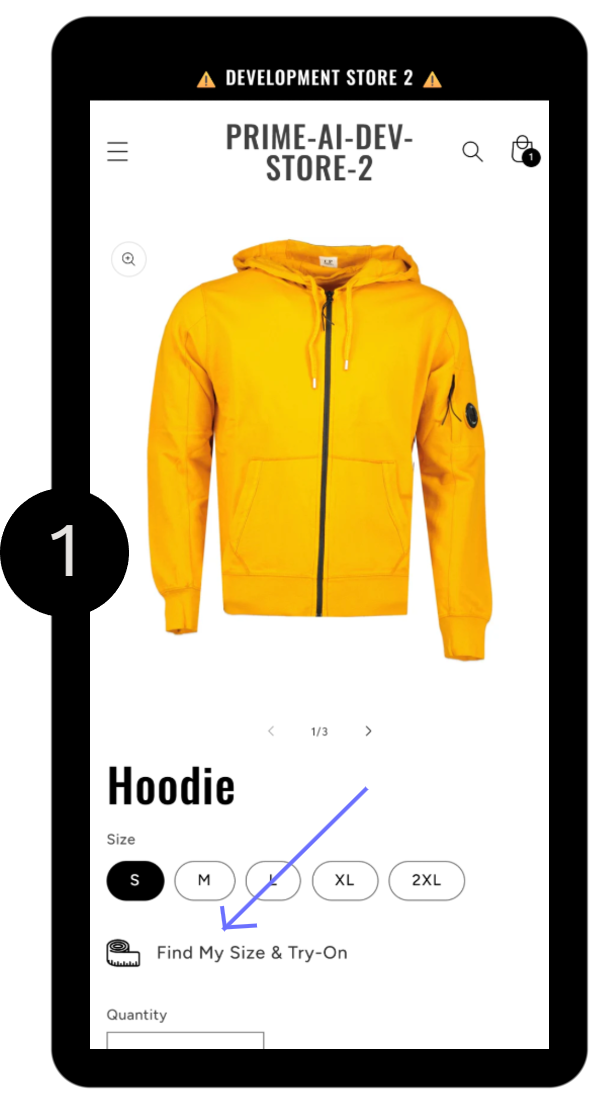
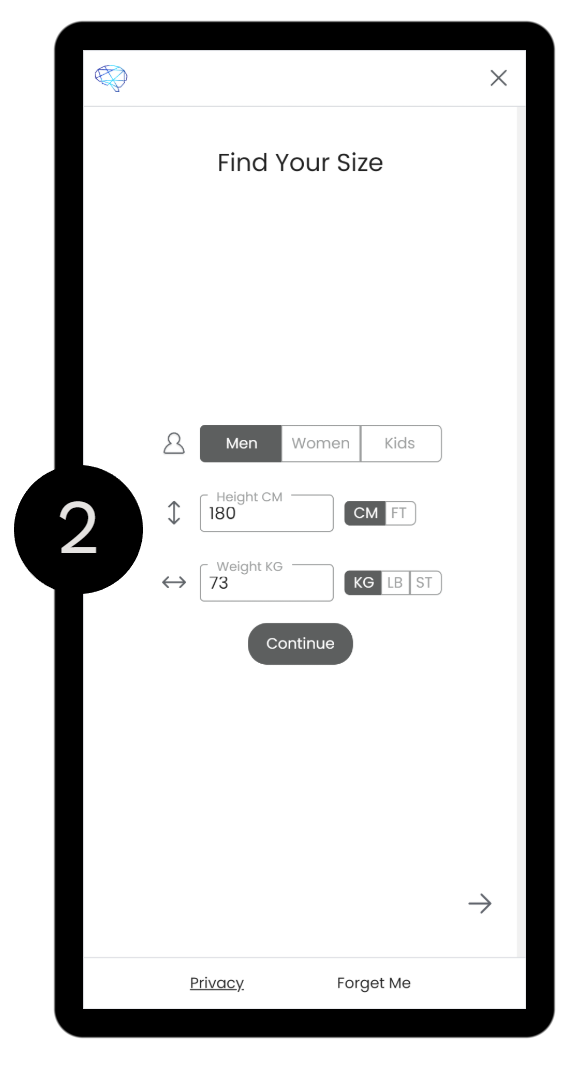
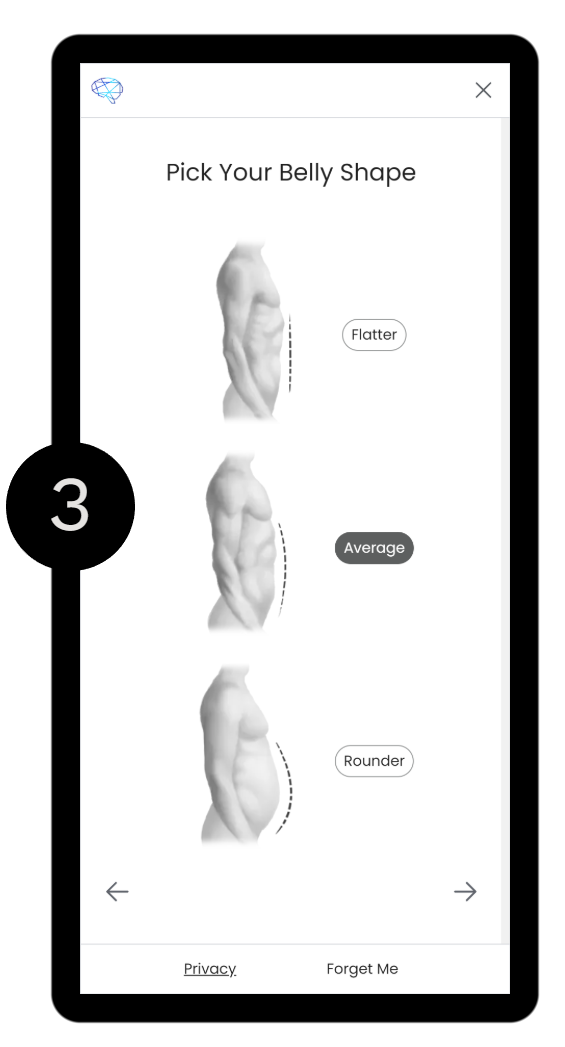
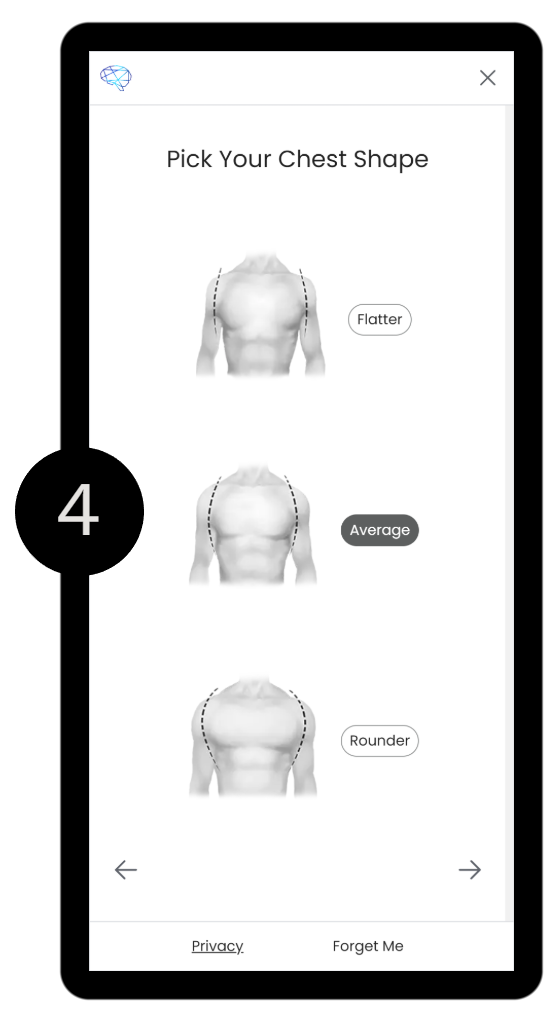
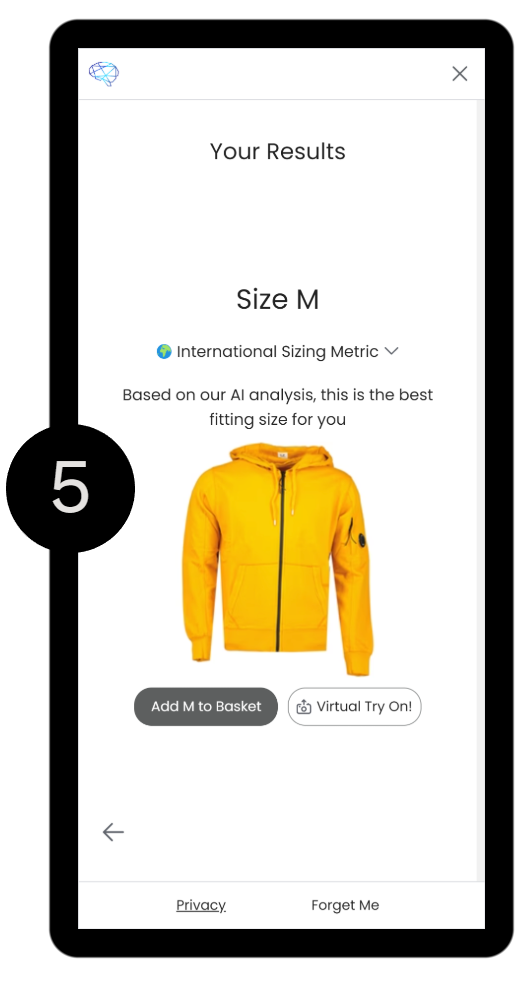
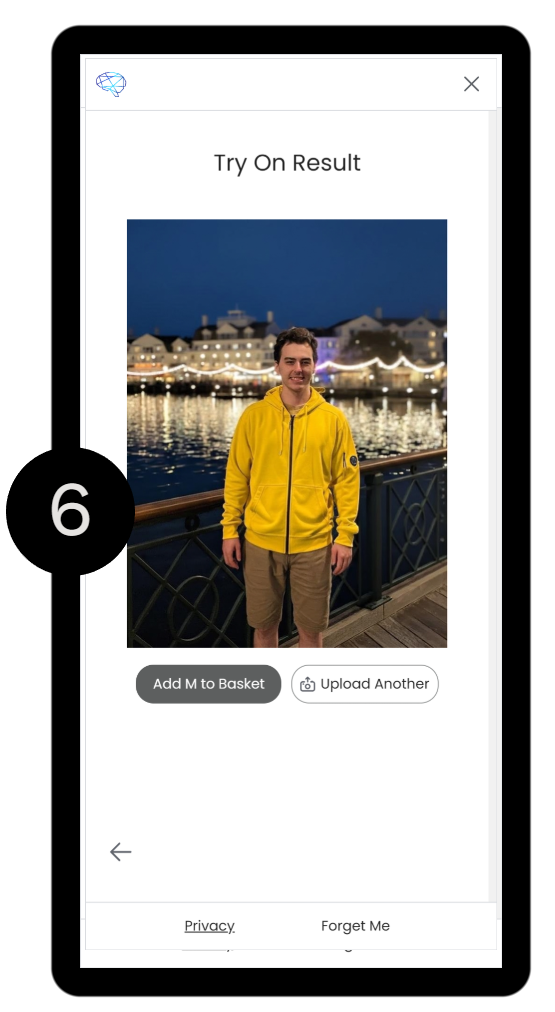
Prueba Virtual es sin esfuerzo para configurar. No se requieren desarrolladores. Está diseñado para ser igual de simple para sus clientes, proporcionando un experiencia de prueba sin inconvenientes con pasos mínimos. En la aplicación independiente de Prueba Virtual, puedes sigue los pasos a continuación en la imagen cercana para verla visualmente.
Cómo funciona
En el corazón de la operación se encuentra un enfoque de IA complejo y multicapa, todo unido para predecir cómo debería verse la ropa en una persona.
Renderizado Fotorealista de Ropa
Reconstrucción de prendas impulsada por IA que preserva la textura, caída, sombras y comportamiento de la tela, brindando a los clientes una experiencia de prueba realista.
Ajuste Consciente del Cuerpo y Drapeado Realista
La ropa se adapta naturalmente a la forma del cuerpo de cada usuario, con estiramientos precisos, pliegues y contornos que reflejan el ajuste en el mundo real.
Generación Inclusiva
Los clientes vienen en una variedad de diferentes formas de cuerpo, alturas y proporciones, y la IA tiene en cuenta esto para una experiencia más personalizada.
Escalable para Grandes Catálogos
Optimizado para manejar miles de SKU sin ralentizar el rendimiento ni requerir trabajo manual de revisión.
Soporte Multilingüe
Disponible en 15 idiomas, y podemos agregar más si los necesitas.
Inglés, Francés, Alemán, Español, Italiano, Holandés, Portugués, Portugués Brasileño, Ruso, Ucraniano, Chino, Japonés, Hindi. Hebreo.
Funciona en cualquier dispositivo
Hemos optimizado esta aplicación para móviles, tabletas y computadoras de escritorio.
Fácil configuración
Instala en menos de 10 minutos - no se requieren desarrolladores.
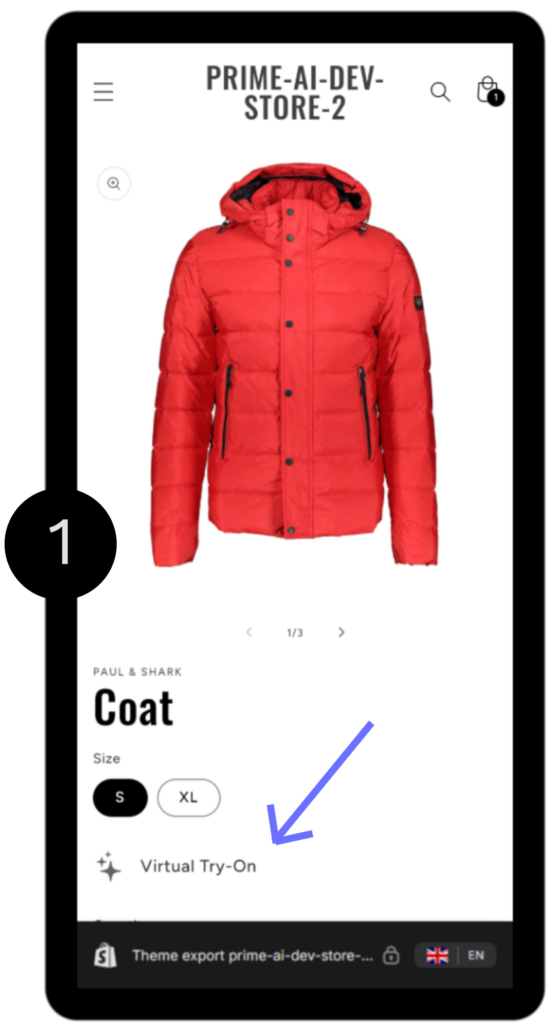
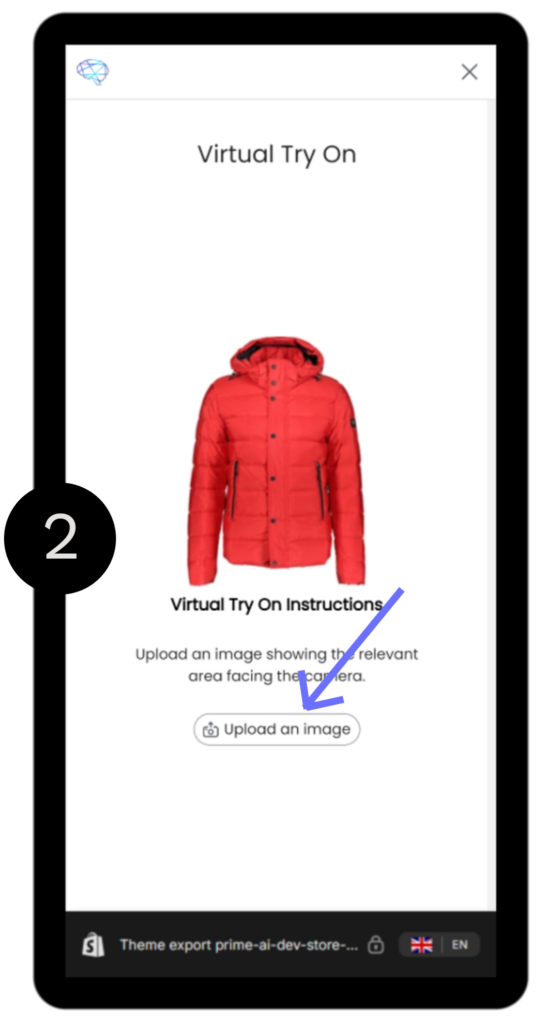
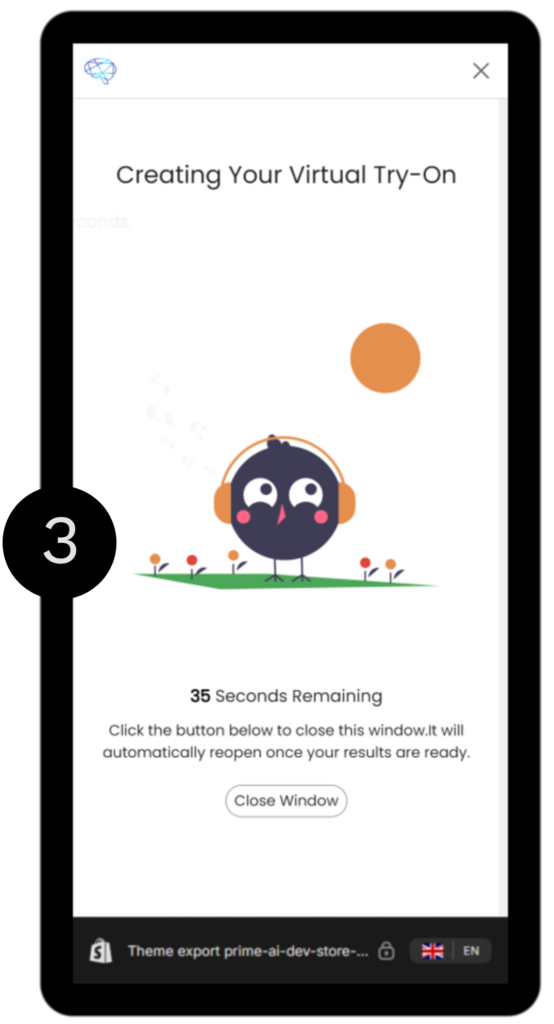
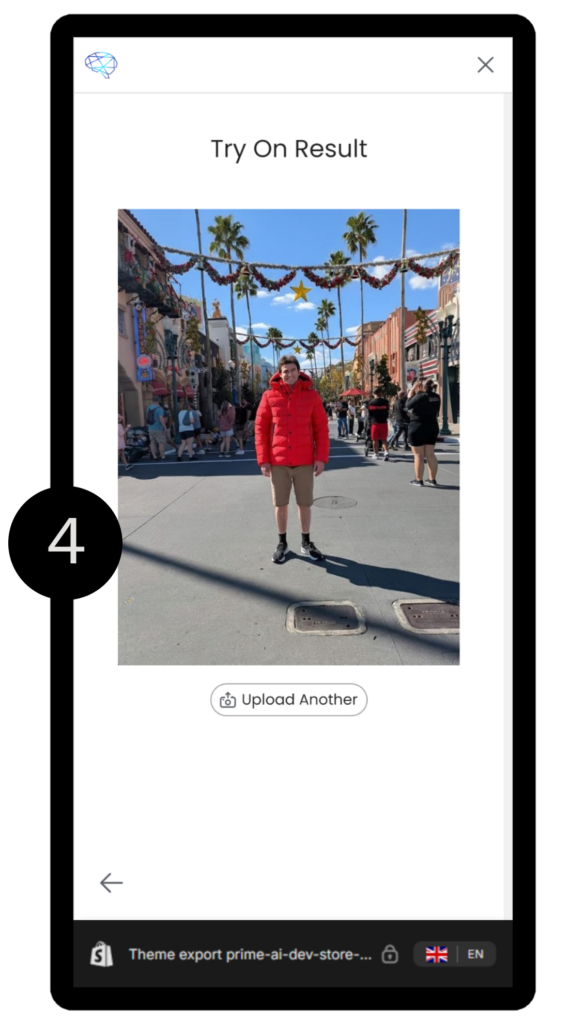
Brinde Confianza a los Compradores con Prueba Virtual
Virtual Try On transforma tus páginas de producto en una verdadera probador digital. Con solo una foto, los clientes pueden vea instantáneamente cómo se ve su ropa sobre ellos. Mejorando la confianza, reduciendo la vacilación y generando más conversiones.
Los compradores obtienen una vista previa realista del ajuste, estilo y aspecto general sin siquiera entrar a la tienda. Para los minoristas, esto significa menos devoluciones, mayor compromiso y mayor satisfacción del clienteEl "Prueba Virtual" cierra la brecha entre la navegación en línea y la experiencia personalizada en el mundo real.
Simplemente, sube una foto. Y verte a ti mismo en esa misma prenda
La opción de Prueba Virtual está disponible como una solución independiente o como parte de la Aplicación de Buscador de Tallas en Shopify.
Dos Niveles de Servicio
Buscador de Talla y Prueba Virtual
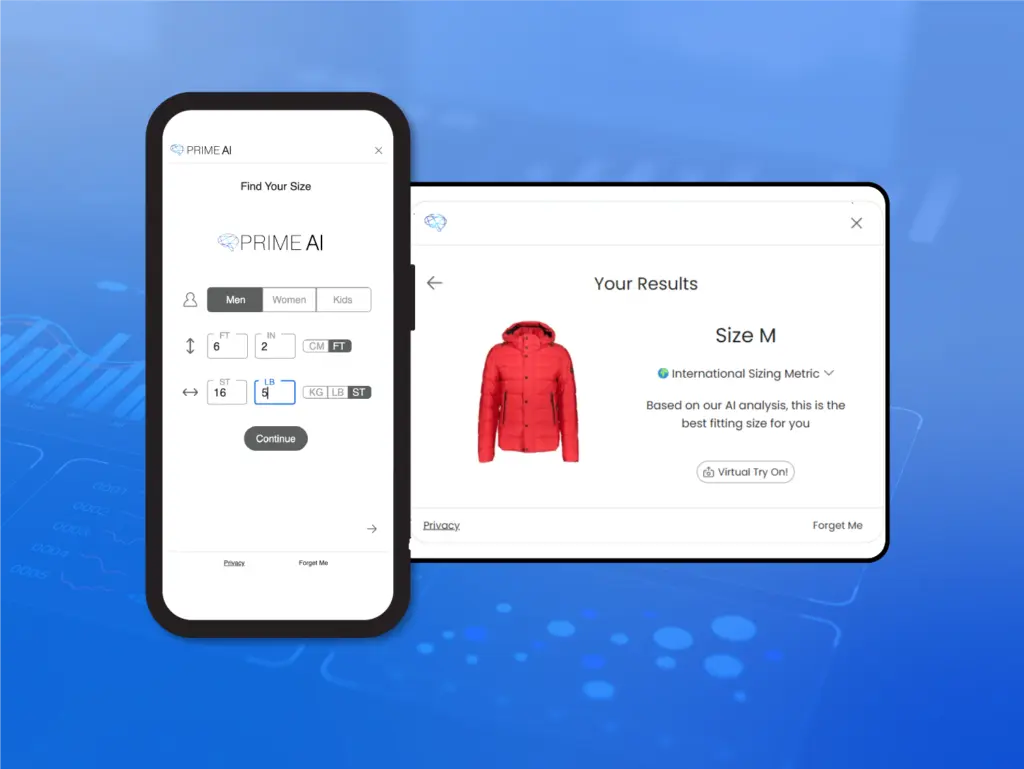
Instala en Shopify ahora, no se requiere codificación
- Ve en vivo en minutos a través de la tienda de aplicaciones Shopify
- Personalizable para tu marca
- Impacto inmediato en las devoluciones y la conversión
- Ideal para implementaciones rápidas y inventarios más pequeños
Prueba Virtual Solamente
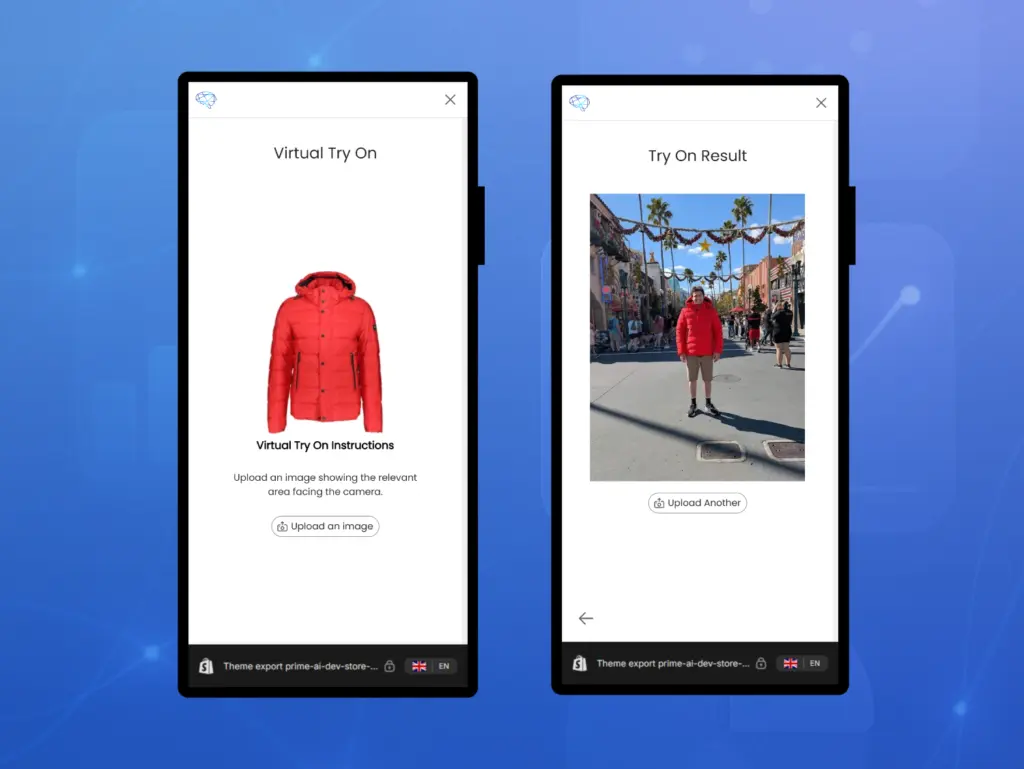
Prueba Virtual, construida completamente alrededor de tu marca.
- Tubería completamente personalizable, interfaz de usuario e flujo de integración
- Utilice nuestros componentes de UX o conéctese directamente en el API
- Implementar en cualquier lugar: tienda, aplicaciones, herramientas internas, etc.
- Diseñado para catálogos complejos, marcas premium y crecimiento estratégico
- Gerente de cuenta dedicado
- Construido para marcas que desean tener plena propiedad de la experiencia, no una plantilla.
Buscador de Tallas y Prueba Virtual
Dale a tus compradores un impulso total de confianza: permíteles ver cómo se ven tus productos en ellos e instantáneamente encuentra el tamaño perfecto.
Con esta poderosa combinación, puedes:
Reduce devoluciones al asegurar que los clientes elijan la opción correcta la primera vez
Aumenta la confianza del comprador con visualización realista y basada en modelos
Moderniza tu tienda con tecnología de comercio electrónico de vanguardia
Impulsar conversiones al eliminar las dos mayores barreras de compra. La incertidumbre en el ajuste y la apariencia
Actualiza tu experiencia con Shopify Prueba Virtual y Buscador de Tallas. disponible ahora.
Precios
¡Créditos Explicados!
Un crédito representa un Intento de Prueba. Cuando subes una imagen, el sistema intentará generar una prueba virtual para esa imagen. La mayoría de las imágenes producen con éxito una prueba virtual, pero no se garantiza que cada carga funcione. Cada intento de carga, ya sea exitoso o no, utiliza un crédito si alcanza la etapa final
Los créditos tienen una vida útil total de 60 días desde su compra inicial. Después de 30 días, se convierten en "Créditos Acumulativos" y 30 días después de eso, expiran.
Créditos Acumulables
Los créditos acumulativos son lo que se convierten tus créditos no utilizados después de 30 días.
Por ejemplo: si compras 100 créditos y te quedan 10 después de 30 días, esos 10 se convierten automáticamente en créditos acumulativos. Estos duran por otros 30 días antes de expirar, dándote tiempo extra para usarlos, pero una vez que ese segundo período de 30 días termina, cualquier crédito acumulado no utilizado se elimina.
30 Créditos
$12
Perfecto para probar.
Comienza pequeño, explora las características y ve resultados inmediatos sin un gran compromiso
100 Créditos
$40
Tu punto dulce de crecimiento.
Un paquete equilibrado ideal para un uso más regular, dando a tus clientes más oportunidades de probarlo.
300 créditos
$120
Para eso, hay Prime AI Pro la actualización de siguiente nivel cuando estés listo para escala más allá de la oferta actual de créditos
¿Más créditos?
Si su uso no se ajusta a nuestros paquetes estándar, comuníquese. Nosotros... personalizar un paquete de crédito eso coincide con tu flujo de trabajo y escala.
Resultados Posibles - Qué Esperar
Nuestra prueba virtual está diseñada para darte una vista previa realista de cómo podría verse la ropa en un cuerpo humano. Sin embargo, es importante entender que los resultados son no perfecto y debería ser considerado Ilustrativas, no representaciones exactas. Será diferente en la vida real.
Detalles Granulares
La IA a veces puede alucinar o modificar detalles. Para ciertos estilos, no es posible alcanzar un 100% de precisión.
Ajuste y Apariencia
La IA asegura que la ropa se vea bien y se ajuste correctamente, independientemente de la forma del cuerpo. Pero no debe ser considerado una representación exacta de cómo la ropa caerá en la vida real.
Ajustes de forma corporal
En algunos casos, la IA puede alterar sutílmente el cuerpo de la persona, haciendo que las áreas parezcan ligeramente más delgadas o más llenas para que se ajusten mejor a la prenda.
Otros escenarios
Patrones muy complejos, iluminación inusual o poses no estándar también pueden afectar la precisión.
Preguntas Frecuentes - FAQ
¿Tienes alguna pregunta? Echa un vistazo a continuación para ver si ya te hemos respondido.
Quiero usar imágenes generadas en mis PDP. ¿Cómo puedo extraer imágenes vestidas?
Simplemente puedes hacer clic derecho y guardar cualquier imagen generada por Virtual Try On, pero esto puede no ser completamente adecuado para lo que estás buscando.
Por ejemplo, es posible que quieras vestir un catálogo de artículos, en este caso, comunícate con nosotros.
¿Puedo simplemente usar la API?
Absolutamente, entendemos que te gusta mantener las cosas bajo tu propio control y podemos acomodarnos absolutamente a tal configuración. En tal configuración, te proporcionaremos documentación sobre cómo interactuar con nuestra API de Prueba Virtual.
¿Y si no uso Shopify?
Muchos de nuestros clientes no utilizan Shopify y eso está perfectamente bien. Trabajaremos contigo para integrar la Solución de Prueba Virtual en tu plataforma. Si no utilizas Shopify y quieres esta solución, comunícate con nosotros
¿Qué pasa si me quedo sin créditos?
Si estás utilizando nuestra solución de aplicación Shopify, el widget simplemente no mostrará el botón de prueba virtual. El botón solo se mostrará cuando tengas créditos disponibles (incluyendo créditos acumulativos).
El día que te quedes sin créditos, serás notificado.
Quiero un botón en línea en lugar del flotante
¿Quieres usar un botón en línea ¿En lugar de la flotante? No hay problema. Aquí te explico cómo configurarlo en Shopify:
Deshabilita el Botón Flotante
Ve a la configuración de tu tema, navega hasta las incrustaciones de la aplicación en el lado izquierdo y simplemente desmarca la aplicación.Agrega el Botón en Línea
Si tu tienda utiliza Tienda en Línea Shopify 2.0 (la versión que admite bloques de aplicaciones), puedes colocar el botón donde quieras:Ve a la página o sección donde quieres que aparezca el botón.
Haz clic en el icono azul de "+" para agregar un nuevo bloque.
Seleccionar Aplicaciones, luego elige nuestra aplicación.
Deja caer el botón en el lugar exacto que deseas.
¿Eres nuevo en Shopify? Siéntete libre de ver el video en la sección de configuración de la aplicación o contáctanos.
¿Cómo compro créditos?
Si está utilizando nuestra solución de aplicación Shopify, navegue hasta la página de "Facturación" y seleccione un plan / conjunto de créditos que mejor se adapte a sus necesidades. Si está fuera de la solución Shopify entonces trabajaremos juntos para encontrar un sistema que funcione mejor para ti para comprar créditos, ya que todas las plataformas son diferentes.
¿Cuántos créditos debo comprar?
Si solo estás probándolo, sugerimos comenzar con el plan más pequeño primero. Nuestra oferta de 30 créditos. Eso te da 30 solicitudes de prueba. Si estás planeando comprometerte con esta solución, sugerimos comprar más de 30 para que tus clientes tengan más oportunidad de usar esta herramienta.
¿Puedo comprar una suscripción recurrente?
Absolutamente, si estás utilizando nuestra solución de Shopify, navega a la página de facturación dentro de la aplicación. Y marca la casilla del plan que deseas configurar como una suscripción mensual.